At CostaCasas, quality labels are based on published guest reviews and clear, objective criteria. They are designed to help guests understand a host’s track record — not to promise a perfect stay.
TrustworthySample · coming soon
Trustworthy
Recognising hosts with a consistent record of good guest experiences.
At least 5 published host reviews.
Average Overall rating of at least 4.2 out of 5.
At least 80% of reviews give 4 or 5 stars.
Fewer than 2 substantiated serious problems in the past 24 months.
ExceptionalSample · coming soon
Exceptional
The highest quality label, based on every criterion below.
At least 10 published host reviews.
Average Overall rating of at least 4.7 out of 5.
At least 90% of reviews give 4 or 5 stars.
Average of at least 4.5 out of 5 on each of the four sub-scores: communication, accurate information, helpfulness and keeping agreements.
No substantiated serious problems in the past 24 months.
These labels are prepared but not yet shown on the website. When they go live, they are calculated automatically from published host reviews — nobody can assign them manually.
One free account for everyone. Log in to reach your dashboard.
02
Add your property
Add the address, description, prices, amenities and photos. Photo categories and fields adapt to the type of stay you choose.
03
Choose your package
Pick a yearly package. No commission per booking.
04
Publish and manage
Our team checks your listing before it goes online. Afterwards you manage details, photos, prices and availability from your dashboard.
05
Synchronise your calendar
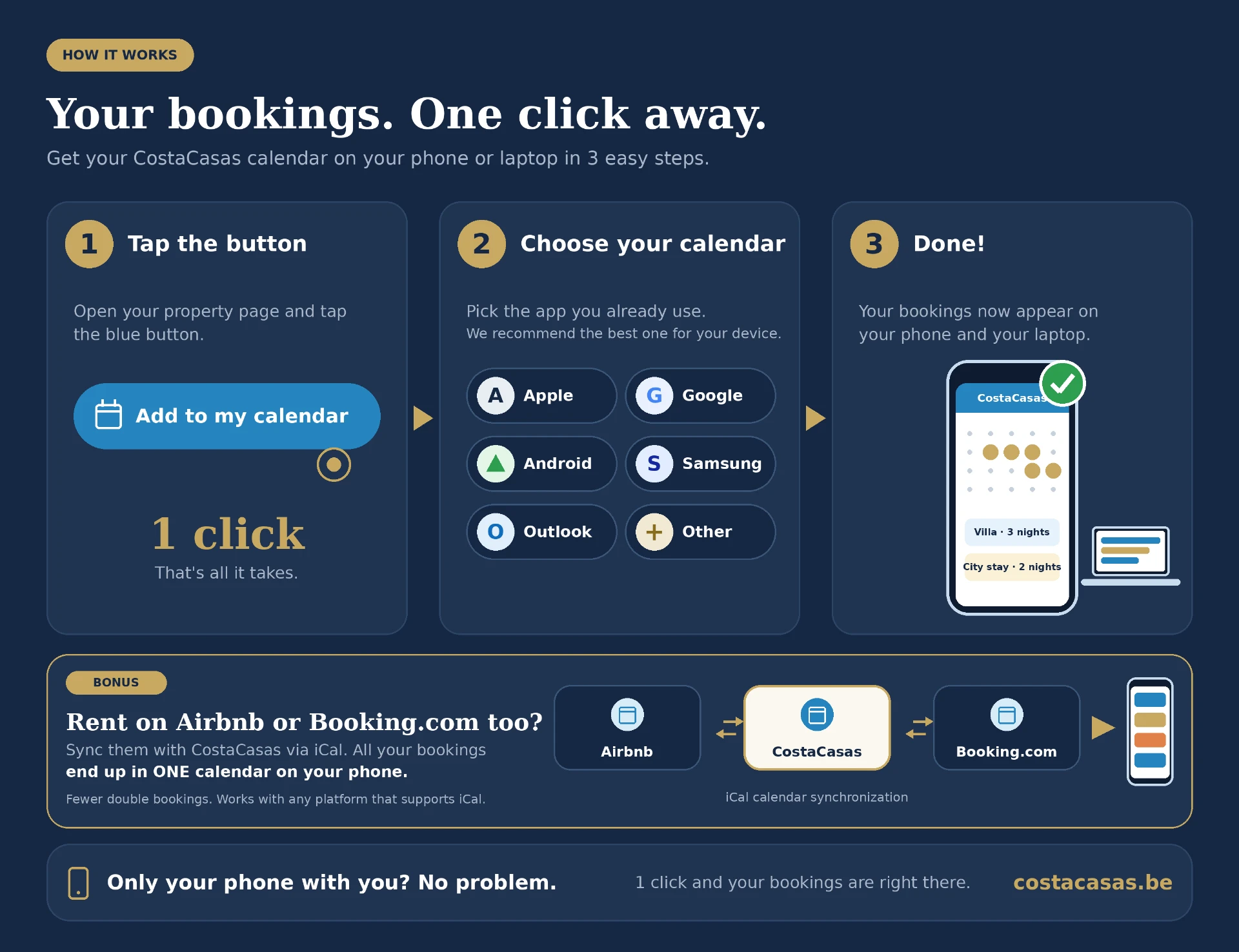
Import iCal links from Airbnb, Booking.com and other services, and export your CostaCasas calendar.
06
Receive enquiries
Contact requests appear in My messages. Accept or decline them; with PREMIUM or PRO an accepted request opens a chat.
07
Agree, sign and manage payments
With PREMIUM or PRO you can create an Easy Contract, sign it, send it and add external payment links. Rental payments go directly to you, never through CostaCasas.
08
Build your reputation
Published reviews from real, contract-based stays help guests get to know you. Keep your details accurate and look after your guests.
09
Increase visibility
PRO adds the PRO badge, more photos, a property video and a monthly refresh as newly listed. We do not promise a number of enquiries or bookings.
BASIC
€49per year
1property · 5photos
No chat or Easy Contract
PREMIUM
€99per year
1property · 12photos
Chat and Easy Contract
PRO
€149per year
2properties · 25photos
Chat and Easy Contract
PRO badge, property video, monthly refresh
Launch promotion: the first 25 approved properties get one year free, subject to the current promotion terms and availability.
Browse holiday homes, city stays, glamping and unique stays, ski and mountain stays, and B&Bs. Search by destination and use the filters for guests, price, amenities and dates.
02
Explore the property
View photos, amenities, location, prices and the availability calendar. The details shown depend on the type of stay and what the owner has added.
03
Contact the owner
Log in or create a free account and send a contact request. When the owner accepts, you can chat if the owner has a PREMIUM or PRO package.
04
Agree on the details
Discuss dates, rental price, deposit, cleaning costs and any extra charges. Sending a message does not create a booking.
05
Arrange the rental agreement
If the owner uses Easy Contract, they prepare the agreement, sign it and send it to you. You review it and sign or decline it.
06
Pay the owner directly
CostaCasas does not collect or hold rental payments or deposits. The owner may add an external payment link to the agreement; you pay the owner through that method.
07
Prepare for your stay
Use your messages to arrange arrival, check-in, check-out and practical questions with the owner.
08
Share your experience
After a stay with a signed agreement, you can review the property and the host. Reviews are published when both sides have reviewed, or after 14 days.
Messaging
Messages on CostaCasas — clear, direct contact
Contact the property owner directly through CostaCasas. First send a contact request. Once the owner accepts, you can continue the conversation in Messages and discuss your stay together.
Sending a contact request does not confirm a booking. You and the owner agree on the details directly.
From clear payment arrangements to a signed contract: everything together in one place, with direct contact between landlord and renter.
One clear journey
01
Create
Property, renter, stay and arrangements.
02
Landlord signs
The renter then receives an email.
03
Renter signs
Review and sign through their own account.
04
Keep the PDF
Both parties find the PDF in their account.
New / Payment links & payment overview
Your guest pays you. Not the platform.
Set your default payment method and link via Account → Profile. You can use a different external link for each payment.
Illustrative payment schedule (demo) — not a real contract
Payment
Amount
Due date
Status
Advance payment
€300
Due date
StatusPending
Remaining balance
€700
Due date
StatusPending
Security deposit
€200
Due date
StatusPending
01
Track payment status
Report amounts received in full or in part. For a partial payment, you can see what remains outstanding. Failed or refunded is not the same as paid.
02
Clear before departure
The renter sees the amount, currency, due date and destination before opening a link. A click never changes the payment status.
03
Set reminders
Choose a reminder before, on and after the due date. Each reminder is sent at most once; reminders stop when receipt is reported.
04
Request guest details selectively
An optional ID request can be added when drafting. Required details only follow confirmed applicable rules; there is no general passport upload requirement.
CostaCasas.be is an advertising platform. We don't receive rental payments or deposits, don't conclude rental contracts on behalf of the owner or renter, and don't act as a landlord.
Find your next stay
Discover unique places, connect directly with owners and organise your next trip with confidence.
Search by destination, dates and guests. Choose holiday homes, city stays, B&Bs, glamping or mountain stays. Contact the owner directly to discuss availability and arrangements.
Offer your accommodation for rent, not for sale. Create an account or sign in, choose your package and add your rental accommodation. Select the correct accommodation category and type before completing the details. Photo categories adapt to your stay type. Upload limits apply per property; changing the type does not delete existing photos. Review your details before submitting. Approval is not publication.
Annual advertising packages, not booking fees. Regular prices are shown below. Choose the presentation and features you need; creating a free account does not unlock paid owner features.
BASIC€49per year
5photos · 1properties
Basic listing of the property
Dedicated property page
Availability calendar
Contact option for renters
Calendar Connection — connect your CostaCasas calendar to your personal calendar with ease
PREMIUM€99per year
12photos · 1properties
Everything from Basic
Premium badge
More extensive presentation of the property
Easy Contracts & Payment Tracking — create contracts in a few steps, track payment status, due dates, outstanding balances and history
PRO€149per year
25photos · 2properties
Everything from Premium
Most extensive presentation
Video of up to 45 seconds
Video may include drone footage
1 panoramic photo to showcase the property and surroundings
↗ Automatically featured at the top once per month
Owners need active PREMIUM or PRO access for Easy Contracts & Payment Tracking. Draft and check the stay details and arrangements; the owner signs first, then the renter signs through their own account using the contract email address. Contracts are available in English, Dutch, Spanish, French and German. The owner selects the contract language before sending; the website language does not change it. Existing signed agreements remain unchanged. Both parties can keep the signed PDF. CostaCasas is not a party to your rental agreement.
Sign in with a free account to request contact for an available listing. Only the property owner can approve the request. Chat is free for searchers when the owner has active PREMIUM or PRO. BASIC owners have no internal chat; use the listing contact form when available. If the owner package expires, chat pauses and existing messages remain; access can return after renewal. An approved request is not a booking, rental contract or payment.
I cannot confirm a current launch offer here. Check the offer page for current availability and conditions.
Open your property in My properties to manage availability. Mark unavailable dates or connect an iCal feed from another platform. Imported bookings and manually blocked dates share the calendar. iCal updates availability, not prices. Guests can view availability on your listing; confirm arrangements directly with the owner.
Sign in first for your personal overview. Paid features remain subject to your package.
Owners need active PREMIUM or PRO access for Easy Contracts & Payment Tracking. Draft and check the stay details and arrangements; the owner signs first, then the renter signs through their own account using the contract email address. Contracts are available in English, Dutch, Spanish, French and German. The owner selects the contract language before sending; the website language does not change it. Existing signed agreements remain unchanged. Both parties can keep the signed PDF. CostaCasas is not a party to your rental agreement.
Rental payments and deposits go directly between the parties, not to CostaCasas. Payment tracking records reported receipts, partial amounts, outstanding balances and due dates. Opening a payment link does not prove payment. Check the actual payment and existing status before confirming receipt; ask the other party if anything is unclear.
Sign in first for your personal overview. Paid features remain subject to your package.
Sign in with a free account to request contact for an available listing. Only the property owner can approve the request. Chat is free for searchers when the owner has active PREMIUM or PRO. BASIC owners have no internal chat; use the listing contact form when available. If the owner package expires, chat pauses and existing messages remain; access can return after renewal. An approved request is not a booking, rental contract or payment.
Sign in first for your personal overview. Paid features remain subject to your package.
One account lets you search for stays, offer accommodation for rent and manage service advertisements; no account-type choice is needed. Sign in to open your dashboard. Waiting for you groups contact requests, unread messages, contracts requiring your signature and payments that need action. My properties and Agreements open the existing tools. Paid features still require the appropriate active package.
Sign in first for your personal overview. Paid features remain subject to your package.
Use the existing CostaCasas contact page. I cannot check private account problems, legal obligations, contract contents or payment receipt. If the answer is uncertain, contact CostaCasas or the other party rather than relying on a guess.